
Events
Showcase your upcoming events
Event Content Type
The Event content type is used to create pages for events and includes details such as the title, date, time, location, and description. When published, the event can appear on calendars and event listings across sites.
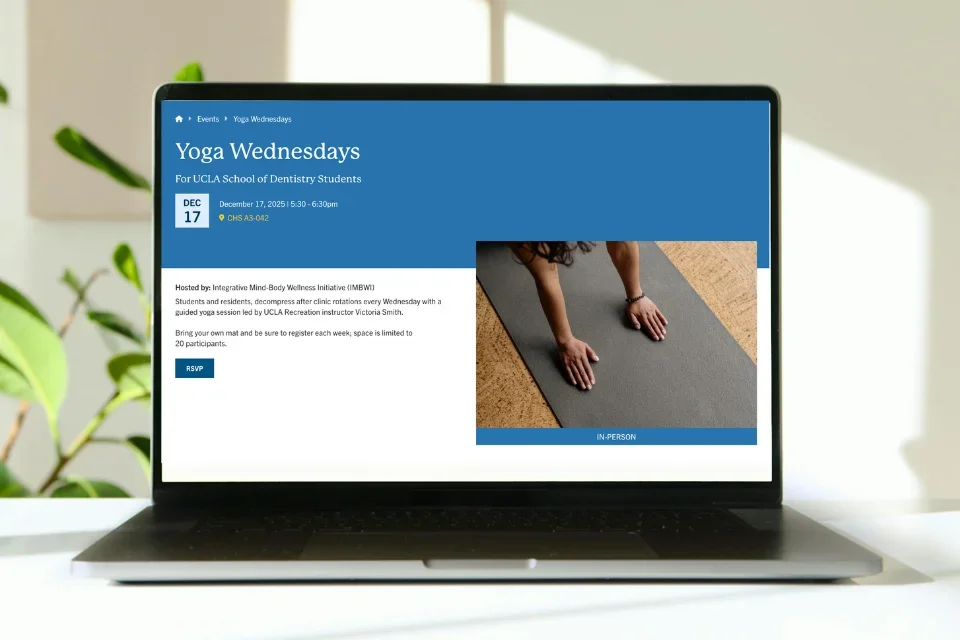
The Events Hub
All Web Platform Healthsciences events are stored in a central repository called the Events Hub and are then shared across the appropriate sites. This allows users to easily find events that are relevant to them.
All Mednet users can submit an event to the Events Hub, regardless of whether they have permission to edit content on the Web Platform Healthsciences.
How to Add an Event
Step One: Submit Your Event
Any individual with Mednet credentials can submit an event. To ensure your event appears in relevant search listings and on appropriate webpages, select the correct search listing options and affiliated groups (the approved hosts or co-hosts of your event). See instructions below for specific groups.
Academic Affairs
Any individual with Mednet credentials can submit an event. Once submitted, your event will be reviewed by a content approver before it is posted. Follow the steps below to submit an Academic Affairs event.
Login to add an event
- Log in to the Events Platform using your mednet credentials
- Click Content (Page Icon) on the left side menu panel.
- Click Add content button.
- Select Event from the list of content types.
Fill out the event form
- Title - [required] The text entered in the title field will be included in the "breadcrumbs" and will become the page's URL unless otherwise configured. Best practice will be to keep this concise and to the 80 character limit.
- Subtitle -Add a subtitle if your title is too long
- Featured Media - [required] Choose from existing photos on your site or upload one from the files on your computer. Avoid using media with graphs or text as these images are not accessible.
- Who will review this event submission? - [required] Select Academic Affairs
- Event Date - [required] Select the date and time of your event.
- If your date is recurring, select the "Repeats" from the drop-down menu to configure the occurrence.
- Address - [required if your event in is person] Selecting the country from the drop down will open the form for you to input the address for your event.
- For the organization field please add a specific event space, i.e.: building and room number.
- Link to Event - For registering for the event/ virtual meeting link. URL is for your registration link, (Zoom) and the "Link Text" field will be what the button says for the link. Remember to accessibly best practices and avoid using link text that say "Click Here."
- Body - Enter a summary of the event.
- Search Engine Optimization (SEO)
- Meta Description – [required] The short summary displayed underneath the URL in Google’s search results as well as the Web Platform Healthsciences search pages.
- Distribution - Select DGSOM
- Search Listing Options - These selections will impact where the events will be syndicated.
- Event Type - [required] Hybrid, In-Person, or Hybrid
- Target Audience - Faculty & Staff (if applicable)
- Event Topic - Education & Career Development (if applicable)
- Other Affiliated Group(s) - Academic Affairs
Submit the event
For regular users:
- Click Save to submit you event. Once you submit your event, it will be reviewed by a content editor prior to being posted.
- Note: once you submit an event, you will lose access to make edits on the event.
- To make updates or follow up on event approval, contact the content editor for Academic Affairs: Medschool Contacts
For event editors:
- Under Additional Options, select publish from the "save as" dropdown to publish the event.
- Once your event is published, it may take up to 6 hours for your event to show up on the Medschool website.
Admissions
Select these terms for events to show up correctly in search listings and on the Admissions, Pre-Health, and Financial Aid and Scholarship pages on the site.
Who will review this event submission?
Content review: Admissions
Distribution
Distribution: DGSOM
Search Listing Options
Target Audience:
- Prospective Students
- MD Students (for Financial Aid and Scholarship event)
Other Affiliated Group(s)
-
Select Office of Admissions for the event to show up on the Admissions page
-
Select Office of Outreach and Pathway Programs for the event to show up on the Pre-Health Connect with Us page
-
Select Office of Financial Aid and Scholarships for the event to show up on the Financial Aid and Scholarships page
Clinical and Translational Science Institute (CTSI)
Select these terms for events to show up in relevant search listings, on the CTSI website, Research webpages, and the DGSOM Weekly Digest.
Who will review this event submission?
Content review: Clinical and Translational Science Institute
Distribution
-
Distribution: DGSOM
-
Feeds: Digest (for research seminars)
Search Listing Options
Event Category: Choose the event category when applicable
- Classes and Workshops
- Lectures & Seminars
- Grand Rounds
- Meetings & Conferences
Event Type: Choose the event type when applicable
- Deadline
- Hybrid
- In-person
- Virtual
Deadlines: Choose the type of deadline when applicable
- Consultation Appointments
- Diversity Opportunities
- Funding Opportunities
- Opportunities from our Partners
- Training Grant Opportunities
Event Topic: Choose the event topic when applicable
-
Education & Career Development
-
Research & Technology
Other Affiliated Group(s)
Choose Clinical and Translational Science Institute
Continuing Education (CE) Courses
Select these terms for events to show up in relevant search listings, on the Center for Continuing Professional Development webpages, and the DGSOM Weekly Digest.
Who will review this event submission?
Content review: Center for Continuing Professional Development
Distribution
Distribution: DGSOM
Search Listing Options
Event Category: Continuing Education
Event Topic: Choose the event topic when applicable
- Education and Career Development
- Research and Technology (for research seminars)
Other Affiliated Group(s)
Group: Center for Continuing Professional Development
Emergency Medicine
Select these terms for events to show up in relevant search results, on the Emergency Medicine website.
Who will review this event submission?
Content review: Emergency Medicine
Distribution
- Distribution: DGSOM
Other Affiliated Department(s)
Group: Emergency Medicine
Inclusive Excellence (OIE)
Select these terms to make sure events show up in relevant search listings, the OIE webpages, MD Student webpages, and Student Organizations website.
Who will review this event submission?
Content review:
- Inclusive Excellence
- Student Organizations (for OIE-affiliated MD communities)
Distribution
Distribution: DGSOM
Search Listing Options
Event Topic:
- EDI/OIE/HEDI
- Education & Career Development (when applicable)
- Health & Wellness (when applicable)
Target Audience: MD Students
Affiliated Student Organization(s)
For events hosted OIE-affiliated MD Communities, select the student organization hosting the event
Other Affiliated Group(s)
For OIE Office hours and other OIE events, select Inclusive Excellence (OIE)
Jonsson Comprehensive Cancer Center (JCCC)
Select these terms for events to show up in relevant search results, on the JCCC website, Research webpages, and the DGSOM Weekly Digest.
Who will review this event submission?
Content review: Jonsson Comprehensive Cancer Center
Distribution
-
Distribution: DGSOM
-
Feeds: Digest (for research seminars)
Search Listing Options
Event Category: Choose the event category when applicable
- Classes and Workshops
- Lectures & Seminars
- Grand Rounds
- Meetings & Conferences
Event Topic: Choose the event topic when applicable
-
Education & Career Development
-
Research & Technology
Other Affiliated Group(s)
Group: Jonsson Comprehensive Cancer Center
Mary S. Easton Center for Alzheimer's Research and Care
Select these terms for events to show up correctly in search listings and on the Easton Center website.
Who will review this event submission?
Content review: Mary S. Easton Center for Alzheimer's Research and Care
Distribution
Distribution: DGSOM
Search Listing Options
Target Audience: Community
Other Affiliated Group(s)
Mary S. Easton Center for Alzheimer's Research and Care
MD Student Events
Select these terms to make sure events show up in relevant search listings, the MD Education webpages, and the Student Affairs Newsletter.
Who will review this event submission?
Content review: MD Students
Distribution
Distribution: DGSOM
Search Listing Options
Event Topic: Choose an event topic when applicable
- Education & Career Development (to be included in the Student Affairs Office Newsletter)
- Health & Wellness (to be included in the Student Affairs Office Newsletter)
Target Audience:
- MD Students
Other Affiliated Groups
Office of Career Development & Well-Being (if applicable)
Affiliated Student Organization(s)
Choose the affiliated student organization (if applicable)
Research Lectures, Seminars, and Grand Rounds
Select these terms for events to show up in relevant search listings, on the DGSOM Research webpages, and the DGSOM Weekly Digest.
Who will review this event submission?
Content review: Research
Distribution
Distribution: DGSOM
Search Listing Options
Target Audience: Choose the target audiences when applicable
- Faculty & Staff
- PhD Students
- Postdoctoral Scholars
- Researchers
Event Topic: Choose the event topic when applicable
- Research & Technology
Affiliated Department(s)
Choose any affiliated Basic Science Departments, Clinical Departments
Other Affiliated Group(s)
Choose any affiliated Education and Research Centers, Research Institutes, or Themed Area
School of Nursing
Select these terms for events to show up in relevant search results on the School of Nursing website.
Who will review this event submission?
Content review: School of Nursing
Distribution
Distribution: Nursing
Other Affiliated Group(s)
Group: School of Nursing
Simulation Center
Select these terms for events to show up in relevant search results, on the Simulation Center website, Research webpages, and the DGSOM Weekly Digest.
Who will review this event submission?
Content review: Simulation Center
Distribution
Distribution: DGSOM
Search Listing Options
Event Topic: Choose the event topic when applicable
- Education & Career Development
- Research & Technology
Other Affiliated Group(s)
Group: Simulation Center
Student Organizations
Select these terms to make sure events show up in relevant search listings, the MD Student and Student Organizations websites, and the Student Affairs Newsletter.
Who will review this event submission?
Content review: Student Organizations
Distribution
Distribution: DGSOM
Search Listing Options
Event Topic: Choose an event topic when applicable
- Education & Career Development (to be in the Student Affairs Office Newsletter)
- Health & Wellness (to be in the Student Affairs Office Newsletter)
Target Audience: MD Students (for events open to all MD students)
Affiliated Student Organization(s)
Choose the affiliated student organization.
UCLA Health IT (UHIT)
Select these terms for events to show up in relevant search results, on the UCLA Health IT (UHIT) website.
Who will review this event submission?
Content review: UCLA Health IT
Distribution
Distribution: UHIT
Other Affiliated Group(s)
Group: DGIT information
Step Two: Event Review
Once submitted, your event will be reviewed by the appropriate content approver before it is posted. If the event does not follow the guidelines, the content approver will request that you revise and resubmit the listing.
Step Three: Event Published
If your event follows our guidelines, the appropriate content approver will publish the event. Once your event is published, it may take up to 6 hours for your event to show up across all sites.